Space tracking and transforms
Brainana tracks each image through a series of coordinate spaces and writes an explicit transform file for every space transition. The diagram below shows all spaces and named transforms for the T1w, T2w, and BOLD modalities.
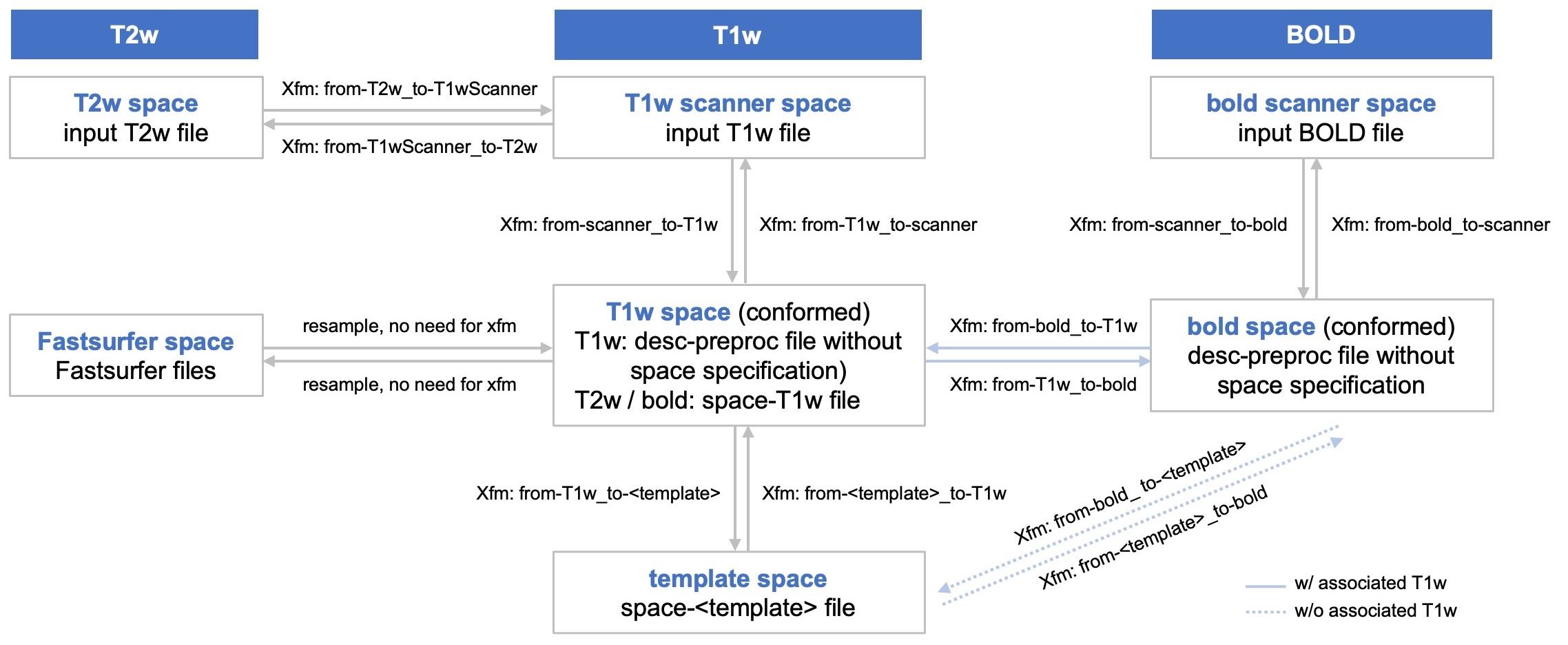
Scanner space (T1w and BOLD native acquisition) uses the BIDS entity
space-scanner. T1w synthesis outputs and atlas backprojection to native grid use this label.T1w is conformed to the template grid (
from-scanner_to-T1w), then registered to template space (from-T1w_to-<template>). Preprocessed T1w in conformed space is published asspace-T1w_desc-preproc_T1w.nii.gz; template outputs carryspace-<template>.T2w uses
space-T2wScannerfor native T2w synthesis, then is coregistered to T1w scanner space (from-T2wScanner_to-scanner, published asspace-scanner), then brought to T1w (conformed) space by reusing the T1w conformation transform (space-T1w_desc-preproc_T2w).BOLD has its own conformation transform (
from-scanner_to-bold). Within-session coregistration (when enabled) stays in scanner space (space-scanner_desc-coreg_boldref). After conform, the BOLD reference in bold space is published asspace-bold_boldref(session- level when coreg is enabled). Preprocessed 4D BOLD usesspace-bold_desc-preproc_bold(per run). How BOLD reaches template space depends on whether a T1w anatomical is available for the session:With associated T1w — template resampling is performed by composing
from-bold_to-T1wwith the T1w registration transformfrom-T1w_to-<template>; no separate bold-to-template file is written.Without associated T1w — BOLD is registered directly to the template, producing dedicated
from-bold_to-<template>andfrom-<template>_to-boldtransforms.
T1w and template BOLD outputs carry
space-T1wandspace-<template>respectively.Fastsurfer space is reached from T1w (conformed) space by resampling only — no transform file is produced.
When surface reconstruction is enabled, the T1w-space atlases are also projected into Fastsurfer space and onto the cortical surface (nearest neighbour throughout). These outputs use the
space-fsnativeentity (individual Fastsurfer/FreeSurfer surface space): resampled label volumesatlas-<name>_space-fsnative_<prefix>.nii.gzand per-hemisphere surface mapsatlas-<name>_space-fsnative_hemi-<L|R>_<prefix>.func.gii, published underanat/atlas_space-fsnative/.
Transform file reference
All transform filenames follow the convention
<prefix>_from-<src>_to-<dst>_mode-image_xfm.<ext>.
FSL .mat files are rigid conformation transforms; ANTs .h5
files are composite registration transforms (affine ± SyN).
Modality |
File ( |
Direction |
|---|---|---|
T1w |
|
T1w scanner → T1w |
T1w |
|
T1w → T1w scanner |
T1w |
|
T1w → template |
T1w |
|
Template → T1w |
T2w |
|
T2w scanner → T1w scanner |
T2w |
|
T1w scanner → T2w scanner |
BOLD |
|
bold scanner → bold |
BOLD |
|
bold → bold scanner |
BOLD |
|
bold → T1w |
BOLD |
|
T1w → bold |
BOLD (w/o T1w) |
|
bold → template (direct, no associated T1w) |
BOLD (w/o T1w) |
|
Template → bold (direct, no associated T1w) |
Applying transforms to images
Use the demo below to choose source space, target space, and data type. It outputs the matching command.
Single-step paths only — the demo lists direct transforms. If you need two steps, a hint below the code will suggest the intermediate space.
Tool depends on the transform file:
.mat→flirt(FSL).h5→antsApplyTransforms(ANTs)Fastsurfer ↔ T1w →
3dresample(AFNI); no transform file, only a reference image for the target grid.No tool installed? Mount your data and run the command inside the Brainana Docker image:
docker run -it --rm \
  -v <path/to/your/data>:/data \
  liuxingyu987/brainana:<version> bash

# then run your flirt / antsApplyTransforms / 3dresample command as usual
Interpolation is automatic: nearest-neighbour for discrete data (labels, segmentations); trilinear for
flirtand BSpline forantsApplyTransformson intensity images.